Skip to content
View in the app

A better way to browse. Learn more.

rollaclub.com

A full-screen app on your home screen with push notifications, badges and more.

To install this app on iOS and iPadOS
  1. Tap the Share icon in Safari
  2. Scroll the menu and tap Add to Home Screen.
  3. Tap Add in the top-right corner.
To install this app on Android
  1. Tap the 3-dot menu (⋮) in the top-right corner of the browser.
  2. Tap Add to Home screen or Install app.
  3. Confirm by tapping Install.

Lancer '78

Members
  • Joined

  • Last visited

Everything posted by Lancer '78

  1. Nice ! like how you haven't over done it so it still looks like a ute and not some cheap toy :jamie:
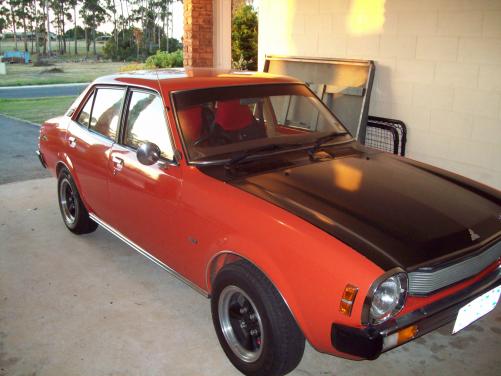
  2. Hey guys heres my first car just wanted to know what people think. 2.6 manual.
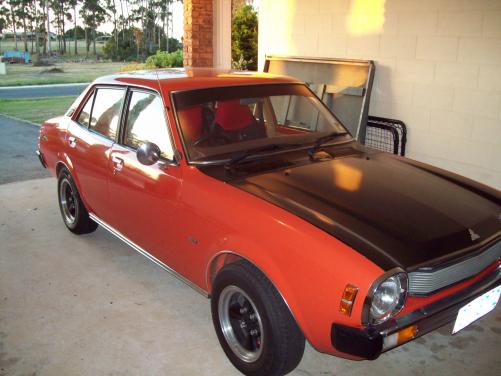
  3. Hey thanks man !! So that might be the reason that it was crowded by corrola's haha Well thats pretty funny lol my bad
  4. My first car, Mitsubiti Chrysler Lancer '78 model, I like it just wanted to know what everyone else thought and any ideas to improve. Just getting my sub put in at the moment and the car has a 2.6 engine :no2:
Account

Navigation

Search

Search

Configure browser push notifications

Chrome (Android)
  1. Tap the lock icon next to the address bar.
  2. Tap Permissions → Notifications.
  3. Adjust your preference.
Chrome (Desktop)
  1. Click the padlock icon in the address bar.
  2. Select Site settings.
  3. Find Notifications and adjust your preference.