

scionlife
Members
-
Joined
-
Last visited
-
...and another 1980 Corolla commercial.
-
Just added a 1980 Corolla commercial to the archive. Click the thumbnails under the chart to view the commercials: http://www.toyotareference.com/corolla#CO80
-
Corrections. Corolla Sport Coupe/Liftback 1.6L is AE71, not AE75. Corolla Sport Coupe/Liftback and SunRunner 1.8L is TE72, not TE75.
-
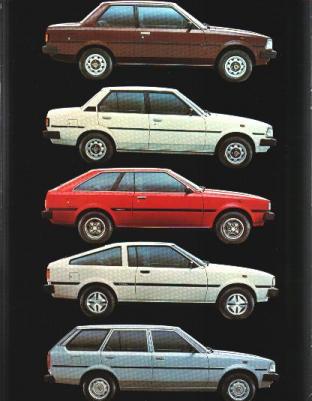
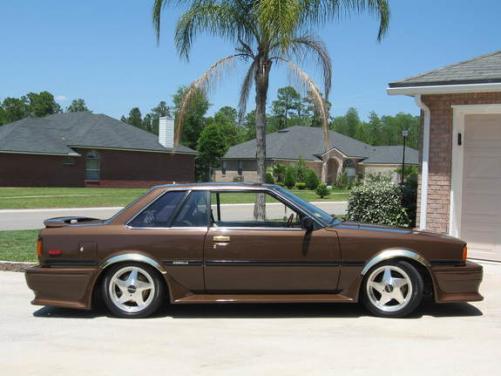
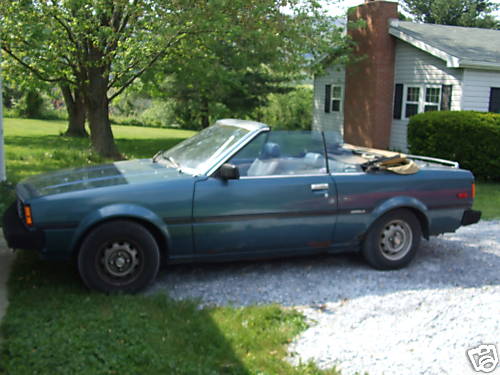
Just made a few updates to the technical information. Added the Corolla hardtop coupe from 1981.5-1983. I didn't even realize it existed until a few minutes ago. Here are all of the models: 2dr Sedan 4dr Sedan Liftback Sport Coupe Wagon Hardtop Coupe (second photo) Sunrunner Convertible by Griffith (third photo)
-
Another cry for help. I'm looking for anyone that might have a classic Corolla brochure. Give me a shout if you have one. Thanks.
-
hey guys, the URL for the page has changed to: http://www.toyotareference.com Also, anyone have a brochure for the 80-83 Corolla? That would really help!
-
Found a list of colors for 1982. I'm not sure if all of these colors were available for both the sedan variants and the hardtop coupes... but until I have a brochure I will list all colors available on both chassis.
-
Here is the color and spec chart for the US-Spec Corolla from 1980-1983. If you see an error please post it here and I will correct the page and graphic ASAP. You can upload a photo of your car to the site by clicking on the above graphic, then clicking on the appropriate camera icon next to your color. I will make updates on the chart within a day of any errors or additions posted. To confirm or add your color to the chart just post a photo or description of your car along with the model year (or production date) and the color code. The three-character color code can be found on the production information affixed to the car.


