Skip to content
View in the app

A better way to browse. Learn more.

rollaclub.com

A full-screen app on your home screen with push notifications, badges and more.

To install this app on iOS and iPadOS
  1. Tap the Share icon in Safari
  2. Scroll the menu and tap Add to Home Screen.
  3. Tap Add in the top-right corner.
To install this app on Android
  1. Tap the 3-dot menu (⋮) in the top-right corner of the browser.
  2. Tap Add to Home screen or Install app.
  3. Confirm by tapping Install.

joel70

Members
  • Joined

  • Last visited

Everything posted by joel70

  1. joel70 replied to joel70's topic in KE70 Projects
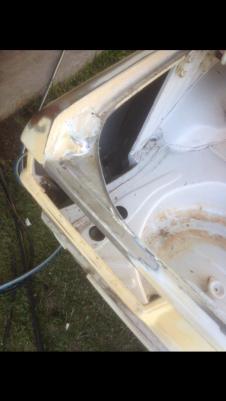
    Here's some photos of the rust I've done
  2. joel70 posted a topic in KE70 Projects
    Hi all, Thought I'd share my ke70 project with youse. I'm new to the scene n this is my first project. I bought the ke for $500 n has a fair bit of rust. N I just finished my trade as a panel beater, I'm currently just making the body straight . I plan to get a sr20 for it which I've got one lined up, n would really love some advice n help with putting in it n what id need, I've heard it's a fair bit of work. I've already bought vanitions n gaurd mirrors . Here some pics of how I got it n what I've done so far.

Account

Navigation

Search

Search

Configure browser push notifications

Chrome (Android)
  1. Tap the lock icon next to the address bar.
  2. Tap Permissions → Notifications.
  3. Adjust your preference.
Chrome (Desktop)
  1. Click the padlock icon in the address bar.
  2. Select Site settings.
  3. Find Notifications and adjust your preference.