Skip to content
View in the app

A better way to browse. Learn more.

rollaclub.com

A full-screen app on your home screen with push notifications, badges and more.

To install this app on iOS and iPadOS
  1. Tap the Share icon in Safari
  2. Scroll the menu and tap Add to Home Screen.
  3. Tap Add in the top-right corner.
To install this app on Android
  1. Tap the 3-dot menu (⋮) in the top-right corner of the browser.
  2. Tap Add to Home screen or Install app.
  3. Confirm by tapping Install.

Hipsi

Members
  • Joined

  • Last visited

  1. Hipsi posted a topic in QLD / Brisbane
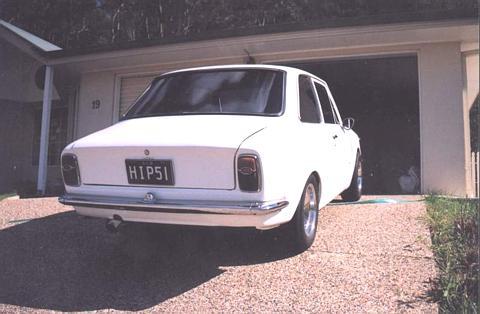
    Hi guys, I sold my KE10 in about 2002 from memory. I’d like to track it down. It’s pretty unique in that I did a 4AGE swap on it but it had a massive firewall recess, fully boxed out. Also had mint red vinyl interior, and Ford GT teardrop mirror. I lived in Mt Warren Park at the time but don’t know where the Kid who bought it lived. cheers Trav.
Account

Navigation

Search

Search

Configure browser push notifications

Chrome (Android)
  1. Tap the lock icon next to the address bar.
  2. Tap Permissions → Notifications.
  3. Adjust your preference.
Chrome (Desktop)
  1. Click the padlock icon in the address bar.
  2. Select Site settings.
  3. Find Notifications and adjust your preference.