Skip to content
View in the app

A better way to browse. Learn more.

rollaclub.com

A full-screen app on your home screen with push notifications, badges and more.

To install this app on iOS and iPadOS
  1. Tap the Share icon in Safari
  2. Scroll the menu and tap Add to Home Screen.
  3. Tap Add in the top-right corner.
To install this app on Android
  1. Tap the 3-dot menu (⋮) in the top-right corner of the browser.
  2. Tap Add to Home screen or Install app.
  3. Confirm by tapping Install.

ms_sportivo

Members
  • Joined

  • Last visited

  1. I'll give it a go, thanks!! :D
  2. Hey thanks guys for all the advice!! I am definately getting bigger wheels and also lowering it. Even though it's standard it still looks hot!! Ms Sportivo!! :D
  3. hey thanks guys! at the moment is standard 1.8, 6 speed manual, leather interior, sports supsension etc i am going to get a rear sway bar so it sits flatter on corners!! here are some pics also !!
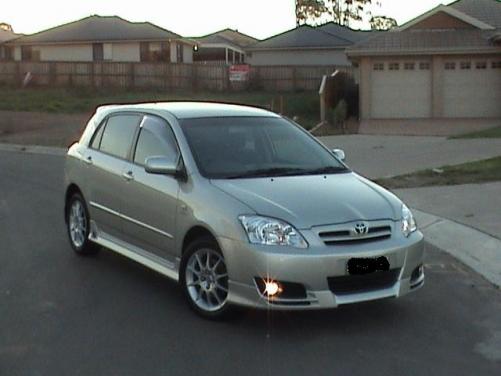
  4. Hey thanks! :P yeah i love it! I've had it for about 1 month now! vey impressed!!!
  5. Hey Everyone, I am the proud new owner of the new may '05 Corolla Sportivo. Does anyone know if there is a particular club for Sportivo's? Ms Sportivo !!! :P

Account

Navigation

Search

Search

Configure browser push notifications

Chrome (Android)
  1. Tap the lock icon next to the address bar.
  2. Tap Permissions → Notifications.
  3. Adjust your preference.
Chrome (Desktop)
  1. Click the padlock icon in the address bar.
  2. Select Site settings.
  3. Find Notifications and adjust your preference.