

fasimba
Members
-
Joined
-
Last visited
Everything posted by fasimba
-
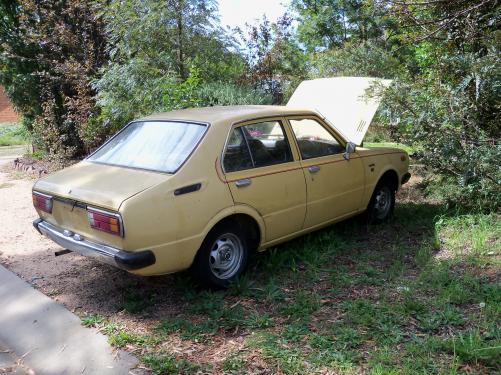
I've been looking at this unit for a while, but just havn't got space to put it. Mark (0429 880235) wants to sell his wifes previous shopper, whick is now archived. its a solid '81 KE55. No plates, but V. good all round. The only thing needs fixing is the radiator. Back end is solid. front bumper not real good, but it has a real cute set of HEADERS. rubber good. mark is asking (negotiable) $400. I could wreck it for similar money. Any interest call mark at above number. If nobody wants it i'll buy it myself and park it on the roof. mick (car in rivett. been under a tree for a while, onboard vegetation free. NO BATTERY)
-
Thanks for the heads up sammo and seabiscuit. The old girl isnt registered yet. I drove it up from wodonga with no plates, got a RTA permit, and drove wodonga-woden and didnt see a single highway patrol car on the whole trip. need front guards, preferably white. bumper is a bit bent. but she was rock steady on the highway. needed earplugs cos the crownwheel and pinion seem unhappy. this unit has never even had a radio fitted. thats going to change. hope to catch up in the near future. mick.
-
New to club, have alzheimers, whats happening in the A.C.T.? mick (have 76 panel van, original)
