Skip to content
View in the app

A better way to browse. Learn more.

rollaclub.com

A full-screen app on your home screen with push notifications, badges and more.

To install this app on iOS and iPadOS
  1. Tap the Share icon in Safari
  2. Scroll the menu and tap Add to Home Screen.
  3. Tap Add in the top-right corner.
To install this app on Android
  1. Tap the 3-dot menu (⋮) in the top-right corner of the browser.
  2. Tap Add to Home screen or Install app.
  3. Confirm by tapping Install.

loan_shark

Members
  • Joined

  • Last visited

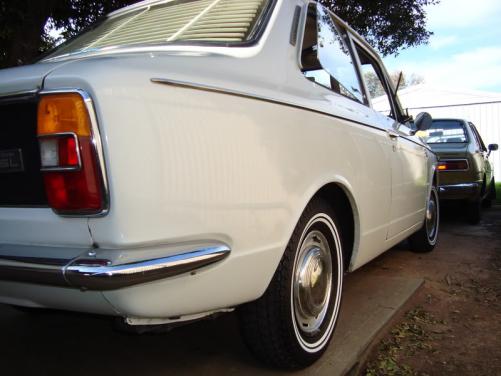
  1. your right my man... venetian blinds... what was i thinking :laff: hehehe... and yah it ain't cheap but it definitely adds flava to it... hahaha yo' da man xmoht, thanks for the info!!! :)
  2. hey thanks for the info my man :) liking this aussie thing to be put on my ke10 back home... so can you point me to the right direction where to order this aussie thing if you may... i know you said ebay and i tried searching "rear shade ke10" and "rear shade 1967 corolla" and it didn't give me any hits for it...
  3. greetings! kudos for your white corolla :P not from around your area though wanna know where you got the rear shade? thanks! :abuse:
Account

Navigation

Search

Search

Configure browser push notifications

Chrome (Android)
  1. Tap the lock icon next to the address bar.
  2. Tap Permissions → Notifications.
  3. Adjust your preference.
Chrome (Desktop)
  1. Click the padlock icon in the address bar.
  2. Select Site settings.
  3. Find Notifications and adjust your preference.