Skip to content
View in the app

A better way to browse. Learn more.

rollaclub.com

A full-screen app on your home screen with push notifications, badges and more.

To install this app on iOS and iPadOS
  1. Tap the Share icon in Safari
  2. Scroll the menu and tap Add to Home Screen.
  3. Tap Add in the top-right corner.
To install this app on Android
  1. Tap the 3-dot menu (⋮) in the top-right corner of the browser.
  2. Tap Add to Home screen or Install app.
  3. Confirm by tapping Install.

YoungFella

Members
  • Joined

  • Last visited

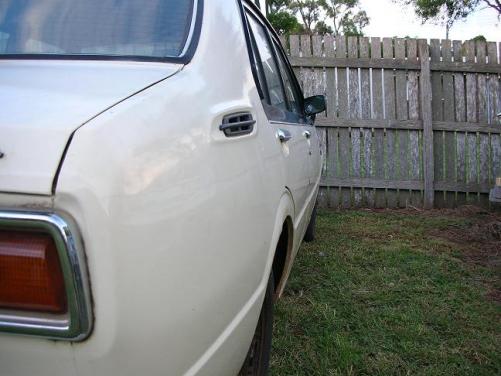
  1. Hi guys, My names Matt. I'm from Toowoomba. I'm 19 years old and sell EFI and Ignition Parts to make my scrape. Some of you may already know my father (Old Fella). I've been wanting to get into Street sprint racing and Hill climbs for some time now, and decided what better to use than an old 'Rolla :-). I've just today picked up what I consider to be a pretty tidy KE30 4 door. The plan is to go fully adjustable front suspension and leaf rear (Anti-tramp bars, reset leaves etc etc). I have also retro-fit an Inductive pick-up and Electronic Module to a K series dissy. So I now have full dwell and current control. I'll do a Tech thread a bit further down the track on this as I believe it's a cheap and simple alternative to the prehistoric points. Hope you like her :-) Matt
Account

Navigation

Search

Search

Configure browser push notifications

Chrome (Android)
  1. Tap the lock icon next to the address bar.
  2. Tap Permissions → Notifications.
  3. Adjust your preference.
Chrome (Desktop)
  1. Click the padlock icon in the address bar.
  2. Select Site settings.
  3. Find Notifications and adjust your preference.