b3arf1ght
Members
-
Joined
-
Last visited
Everything posted by b3arf1ght
-
All sorted now. Fitting instructions failed to mention about priming the pump.
-
New pump is on. No fuel getting to the carby, and all the lines are clear. The carby was rebuilt no more than a month ago. Any ideas?
-
Got Bursosn to swap mine over. New one has the return and its tapped and actually leads somewhere! About to fit her up. Thanks for all the input everyone (:
-
I'm slightly worried about pulling something like that apart though. Yeah, I thought about just running it without the return but I don't want to risk fuel spewing out everywhere.
-
http://www.goss.com.au/products/G305A This is the one I need, but the one got matches all the numbers.
-
Apparently it isn't a serviceable item, so it's a replace job.
-
Thanks mate. Looks like I might need to do a bit more research into blocking the return line I guess.
-
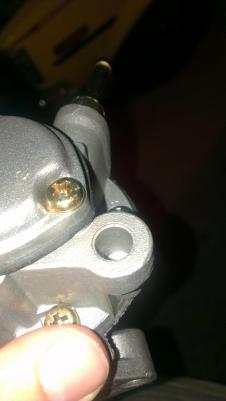
This is what I'm referring too.
-
The wrong** pump
-
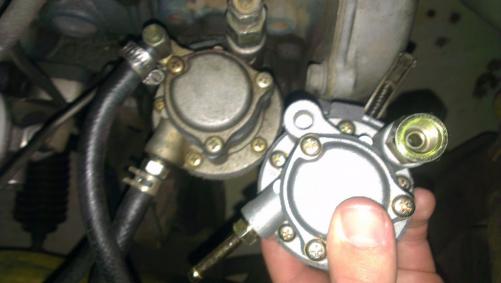
Hey guys. Tuesday morning when I was about to leave for work my sev died whilst I was warming it up. It will turn over but won't fire. Got the RAA around last night to see if I could get a diagnosis, he told me that my fuel pump ha packed it in. Got a new pump from Bursons today, the pump itself is exactly the same as the one on the motor at the moment, except it doesn't have a return line. It has the hole where it should be but it doesn't lead to anywhere and the inside of it isn't threaded. But it came with the necessary return line fitting. Have I been given the wring pump?