Skip to content
View in the app

A better way to browse. Learn more.

rollaclub.com

A full-screen app on your home screen with push notifications, badges and more.

To install this app on iOS and iPadOS
  1. Tap the Share icon in Safari
  2. Scroll the menu and tap Add to Home Screen.
  3. Tap Add in the top-right corner.
To install this app on Android
  1. Tap the 3-dot menu (⋮) in the top-right corner of the browser.
  2. Tap Add to Home screen or Install app.
  3. Confirm by tapping Install.

jnr01

Members
  • Joined

  • Last visited

  1. jnr01 replied to jnr01's topic in Rollaclub Rides
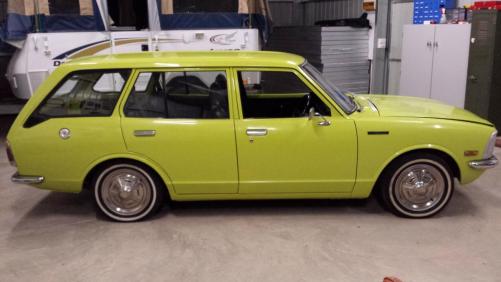
    Yep was Franks .he sold it to a dude in Qld.this guy had it for 18 mnths to 2 years I believe and I picked it up about 1 month ago.cheers Trev
  2. jnr01 posted a topic in Rollaclub Rides
    Gday guys heres a pic of my new rolla .haven't had one for a few years and the last one was a mocha ke20.having a beautiful wife and 2 gorgeous kids thought I might snap up this wagon.needs some mechanical tlc but is most definately driveable.if anyone knows what sort of hubcaps these are I would really like to know.they are 14".cheers Trev
Account

Navigation

Search

Search

Configure browser push notifications

Chrome (Android)
  1. Tap the lock icon next to the address bar.
  2. Tap Permissions → Notifications.
  3. Adjust your preference.
Chrome (Desktop)
  1. Click the padlock icon in the address bar.
  2. Select Site settings.
  3. Find Notifications and adjust your preference.