dirty-30
Members
-
Joined
-
Last visited
-
The one I have found has some rust in her around the rear arches one of the rear vents on the c pillar. The carpet was badly water damaged but from the looks of it the floors were intact. I didn't get a chance to look in the boot area. The motor ran very well I couldn't pin point any weirs noises in it. Roof lining was completely shagged but was original. Rear seat vinyl tops were gone door trims were good and the dash was cracked. This car would also be my transport to and from work as well. At this stage. Which is 70% freeway driving 30 minutes to and from.
-
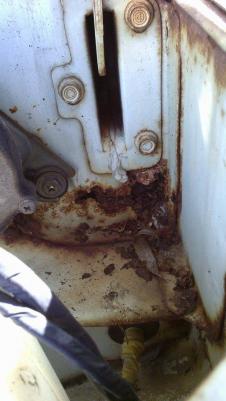
Hey Everyone, I'm looking to buy a KE30 to use as a hillclimb / rally car. I've found one but it has a rusty firewall. The plan was to actually road register this car with minimal work. The paints pretty shoddy but original, its a 4 speed 3K engine. I was originally looking for a Gemini, but with the inflated prices people are asking for them ( when they arnt worth it ) i've decided to open my eyes to other cars and i think the KE Series of Corolla's may be it. I'm a big bloke, 6ft and 90kg i've got a big frame but i felt at home sitting in the KE30! I've never worked on a corolla so i don't know what is hiding behind the rust such as joins etc so i would like some advice on it and the KE30 in general. Josh