ponchomatica
Members
-
Joined
-
Last visited
-
Confirmed it looks like some sort of heater/coolant inlet/outlet, but I can't figure out what it is... :S Here is another cylinder head that actually has the fitting, and this article shows a heater return pipe for a RWD 4A-C that looks like it would fit there... So maybe it is a crossover head? A deprecated heater fitting? The VIN number lookup didn't work with my VIN number, despite the fact that the VIN on the build plate matches the one stamped into the body under the hood, so I have a feeling Australia threw together some off-cuts at some point. My hatch, for example, is designated an AE94 in the VIN number and an AE92R in the model number, despite the fact that E90 series ceased production in 1992 (except in Australia, where we continued production until 1994). In my eyes this cased is closed! Thanks for the input!
-
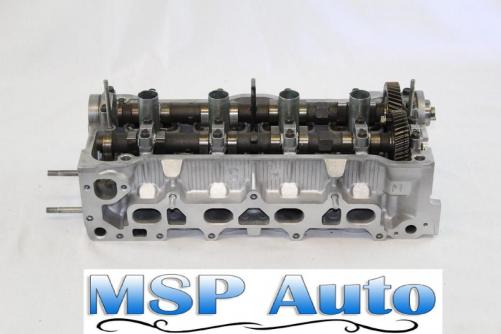
Hi all, New user from Australia, having recently acquired a 1994 Corolla CSi Limited hatchback. I'm on a bit of a rampage trying to figure out what era 4A-FE I'm working with, and hence what can be done to spruce it up. I've found two holes on the intake side of the cylinder head: one for the EGR system (apparently never fitted to mine...), and another for some unknown purpose. I've attached a picture of a cylinder head the same as mine (lifted from here). Bottom left is the EGR port integrated into the intake manifold (which my intake doesn't have), top left is the mechanical fuel pump (which I don't have, obviously), but the bottom right hole is a mystery to me. :S Any ideas?? Cheers!