Skip to content
View in the app

A better way to browse. Learn more.

rollaclub.com

A full-screen app on your home screen with push notifications, badges and more.

To install this app on iOS and iPadOS
  1. Tap the Share icon in Safari
  2. Scroll the menu and tap Add to Home Screen.
  3. Tap Add in the top-right corner.
To install this app on Android
  1. Tap the 3-dot menu (⋮) in the top-right corner of the browser.
  2. Tap Add to Home screen or Install app.
  3. Confirm by tapping Install.

ri.25

Members
  • Joined

  • Last visited

  1. ri.25 replied to ri.25's topic in Rollaclub Rides
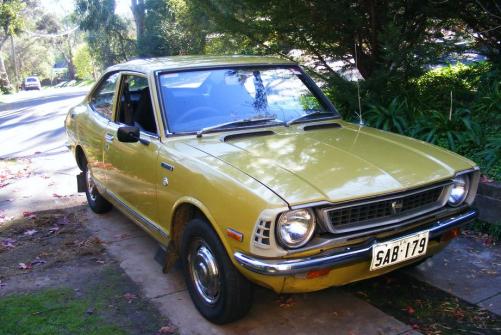
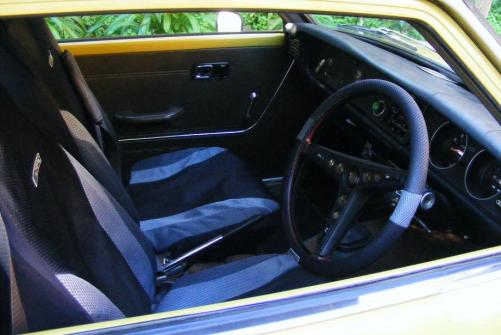
    welll probs still do some more on the interior, get it sounding good i suppose and get some new wheels. at the moment it has mazda wheels. or else ill run white walls on it possible re-spray depending how much it will cost but yea not really sure what i want to do with it.
  2. ri.25 posted a topic in Rollaclub Rides
    hey all, new to the forum here but i thought id show my corolla its a 74? I'm pretty sure.. its only done 96,000 kms on the original motor. tell me what you think
Account

Navigation

Search

Search

Configure browser push notifications

Chrome (Android)
  1. Tap the lock icon next to the address bar.
  2. Tap Permissions → Notifications.
  3. Adjust your preference.
Chrome (Desktop)
  1. Click the padlock icon in the address bar.
  2. Select Site settings.
  3. Find Notifications and adjust your preference.