Skip to content
View in the app

A better way to browse. Learn more.

rollaclub.com

A full-screen app on your home screen with push notifications, badges and more.

To install this app on iOS and iPadOS
  1. Tap the Share icon in Safari
  2. Scroll the menu and tap Add to Home Screen.
  3. Tap Add in the top-right corner.
To install this app on Android
  1. Tap the 3-dot menu (⋮) in the top-right corner of the browser.
  2. Tap Add to Home screen or Install app.
  3. Confirm by tapping Install.

dan_1989

Members
  • Joined

  • Last visited

  1. Pics are up now tell me what ya think cheers
  2. yeah that is true it isnt exactly the fastest off the blocks anything you can do to improve performance?
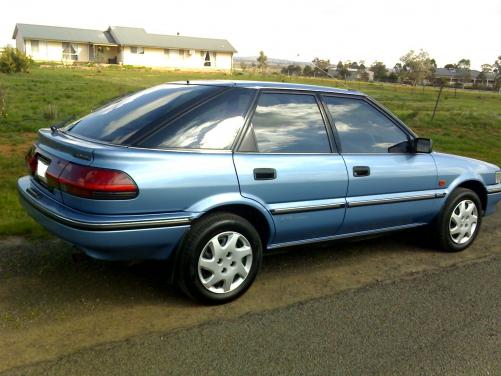
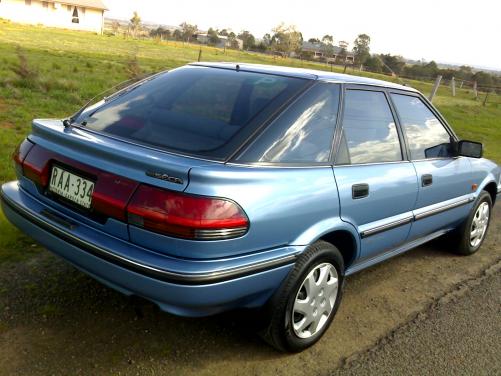
  3. Hi everyone, I'm new to this forum so please bear with me. I have been given a 94 CSI limited seca corolla it has only done 150,000kms and is in immaculate condition i absolutely love this car but it has no mods at the moment I'm thinking of puttin some mods on it bit I'm not sure what would be best id like to know what everyone else thinks about it and some advice cheers :fuzz: dan here are some pics
Account

Navigation

Search

Search

Configure browser push notifications

Chrome (Android)
  1. Tap the lock icon next to the address bar.
  2. Tap Permissions → Notifications.
  3. Adjust your preference.
Chrome (Desktop)
  1. Click the padlock icon in the address bar.
  2. Select Site settings.
  3. Find Notifications and adjust your preference.