Skip to content
View in the app

A better way to browse. Learn more.

rollaclub.com

A full-screen app on your home screen with push notifications, badges and more.

To install this app on iOS and iPadOS
  1. Tap the Share icon in Safari
  2. Scroll the menu and tap Add to Home Screen.
  3. Tap Add in the top-right corner.
To install this app on Android
  1. Tap the 3-dot menu (⋮) in the top-right corner of the browser.
  2. Tap Add to Home screen or Install app.
  3. Confirm by tapping Install.

kristian

Members
  • Joined

  • Last visited

  1. douggehhh its jenna.. i think i curse cars! when i drove your car you had an accident like 2 days after then you drove me and the next day your car set on fire.. (which my sunny had done before tooo) keep me away from the rolla before i do more damage!
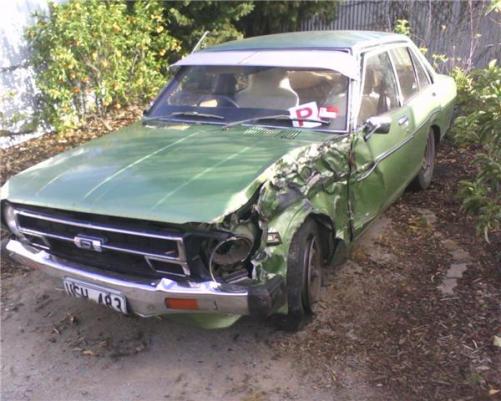
  2. (ehehe now i can go on rollaclub too.. username should be jenna and kristian) omggg! my sunny haha.. it looks not too bad there.. too bad it really looks like this....
Account

Navigation

Search

Search

Configure browser push notifications

Chrome (Android)
  1. Tap the lock icon next to the address bar.
  2. Tap Permissions → Notifications.
  3. Adjust your preference.
Chrome (Desktop)
  1. Click the padlock icon in the address bar.
  2. Select Site settings.
  3. Find Notifications and adjust your preference.