Skip to content
View in the app

A better way to browse. Learn more.

rollaclub.com

A full-screen app on your home screen with push notifications, badges and more.

To install this app on iOS and iPadOS
  1. Tap the Share icon in Safari
  2. Scroll the menu and tap Add to Home Screen.
  3. Tap Add in the top-right corner.
To install this app on Android
  1. Tap the 3-dot menu (⋮) in the top-right corner of the browser.
  2. Tap Add to Home screen or Install app.
  3. Confirm by tapping Install.

rollasth

Members
  • Joined

  • Last visited

Everything posted by rollasth

  1. yeah lol getting kinda over it being so slow
  2. ahh i wanna do another one up get a good motor in it :P
  3. :P yeh I'm going to keep how it is now and save some money for the 5k motor :P
  4. Cheers mate :P 5k??
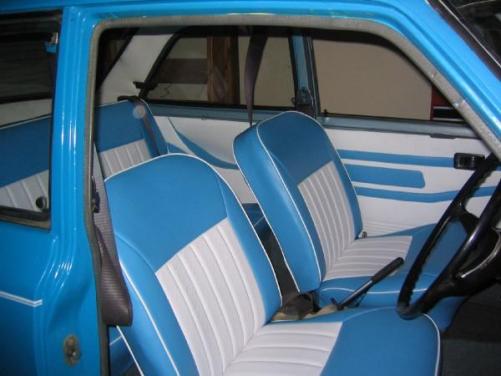
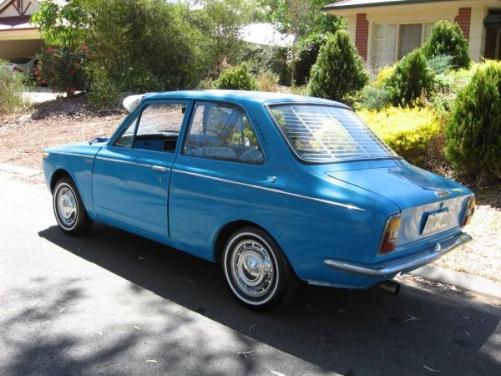
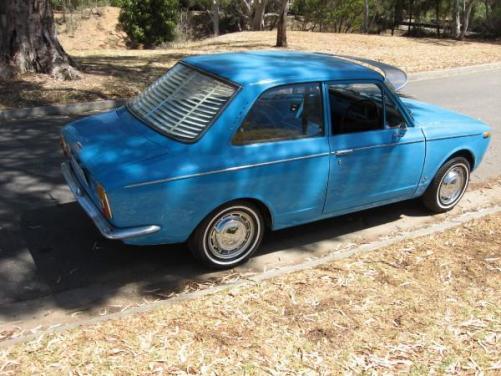
  5. Ke10 Year: 1969 Eng: Unsure think its a 1.1L too slow for my liking :P Interior: been redone Paint: Been resprayed blue Unsure what i wanna do next.. open to suggestions :P Just put her up for sale ;) http://www.rollaclub.com/board/?showtopic=29941#entry340339
Account

Navigation

Search

Search

Configure browser push notifications

Chrome (Android)
  1. Tap the lock icon next to the address bar.
  2. Tap Permissions → Notifications.
  3. Adjust your preference.
Chrome (Desktop)
  1. Click the padlock icon in the address bar.
  2. Select Site settings.
  3. Find Notifications and adjust your preference.