Skip to content
View in the app

A better way to browse. Learn more.

rollaclub.com

A full-screen app on your home screen with push notifications, badges and more.

To install this app on iOS and iPadOS
  1. Tap the Share icon in Safari
  2. Scroll the menu and tap Add to Home Screen.
  3. Tap Add in the top-right corner.
To install this app on Android
  1. Tap the 3-dot menu (⋮) in the top-right corner of the browser.
  2. Tap Add to Home screen or Install app.
  3. Confirm by tapping Install.

rone

Members
  • Joined

  • Last visited

Everything posted by rone

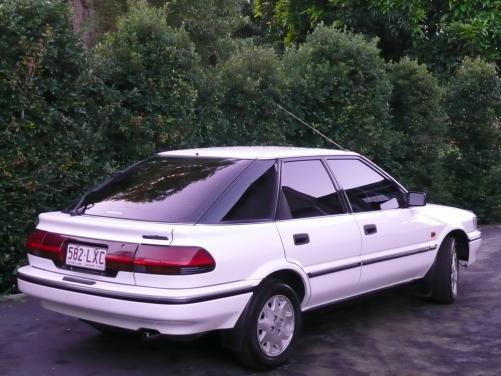
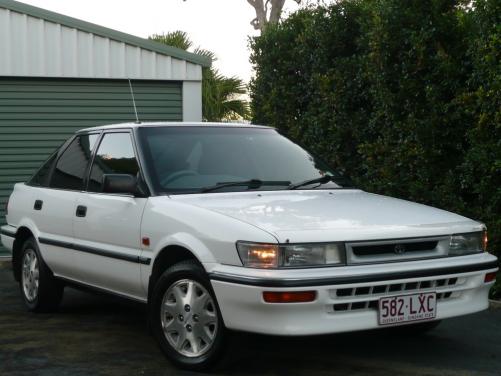
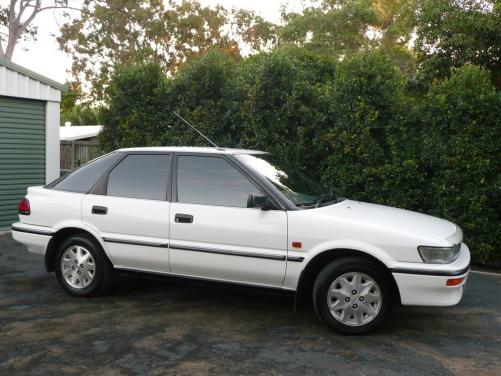
  1. Had this for 6-ish months. The wifes car. She inherited it from her Gran who has had it since new. Obviously being a Nanamobile its a 1.6 Auto! We've left fairly well alone as the car is very original. Garaged its whole life. I've had tints put in, fitted a 200w Sony head unit, scored the alloys from a fellow Rollaclubber in Brizzy (sorry -- forgot your name), Euro wipers, removed the Crime Scene Investigation decals and thats it. A thorough cut-n-polish, new oil and filter and you have an ultra reliable runabout that belies its age very well. Needs front struts 'cause they're shagged and the front nearside wheel bearing has suffered due to the old lady 'park by feel' technique so that is to be replaced, but that's it. Hope you likee...
Account

Navigation

Search

Search

Configure browser push notifications

Chrome (Android)
  1. Tap the lock icon next to the address bar.
  2. Tap Permissions → Notifications.
  3. Adjust your preference.
Chrome (Desktop)
  1. Click the padlock icon in the address bar.
  2. Select Site settings.
  3. Find Notifications and adjust your preference.