Skip to content
View in the app

A better way to browse. Learn more.

rollaclub.com

A full-screen app on your home screen with push notifications, badges and more.

To install this app on iOS and iPadOS
  1. Tap the Share icon in Safari
  2. Scroll the menu and tap Add to Home Screen.
  3. Tap Add in the top-right corner.
To install this app on Android
  1. Tap the 3-dot menu (⋮) in the top-right corner of the browser.
  2. Tap Add to Home screen or Install app.
  3. Confirm by tapping Install.

amadke30

Members
  • Joined

  • Last visited

Everything posted by amadke30

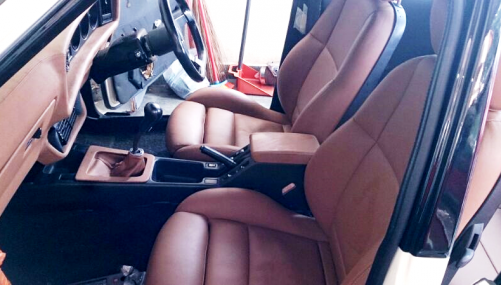
  1. Name: Amad (from Malaysia) Car: Ke30 sedan Motor & Driveline: 7k with k50 Suspension & Brakes: Corona tt141 Wheels & Tyres: Volk Racing 7&8jj, falken ze912 195/45r15 Interior: Front E36 with stock at rear Body: Fully restored since 2013.
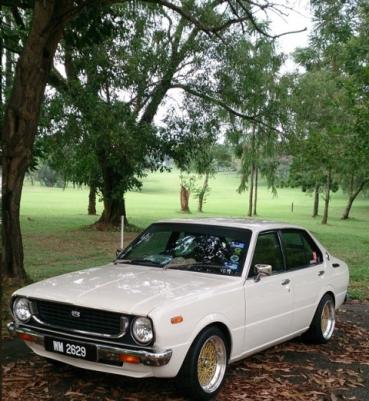
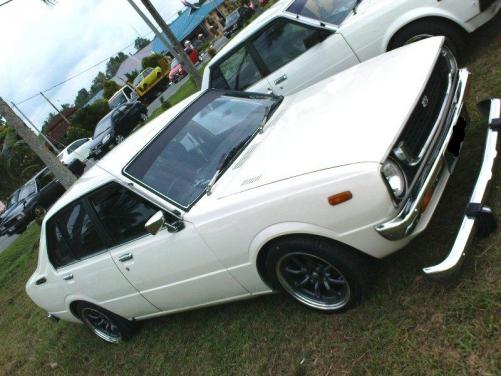
  2. Name: AmadKE30 Car:Corolla KE30 (year1977) Motor & Driveline: 3k (now 7k), dcnf40, accel coil & k50 gearbox Suspension & Brakes: (f)Hotbits spring with KYB super special, ®Tokico from mitsubishi canter Wheels & Tyres: Watanabe 7&7.5jj with falken ziex912 195/45r15 Interior: AE101 seat, with custom made gear console & armrest. Body: Stock (mix with other ke3#) Other: -
Account

Navigation

Search

Search

Configure browser push notifications

Chrome (Android)
  1. Tap the lock icon next to the address bar.
  2. Tap Permissions → Notifications.
  3. Adjust your preference.
Chrome (Desktop)
  1. Click the padlock icon in the address bar.
  2. Select Site settings.
  3. Find Notifications and adjust your preference.