Skip to content
View in the app

A better way to browse. Learn more.

rollaclub.com

A full-screen app on your home screen with push notifications, badges and more.

To install this app on iOS and iPadOS
  1. Tap the Share icon in Safari
  2. Scroll the menu and tap Add to Home Screen.
  3. Tap Add in the top-right corner.
To install this app on Android
  1. Tap the 3-dot menu (⋮) in the top-right corner of the browser.
  2. Tap Add to Home screen or Install app.
  3. Confirm by tapping Install.

ruf05

Members
  • Joined

  • Last visited

Everything posted by ruf05

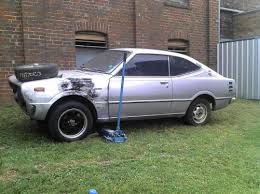
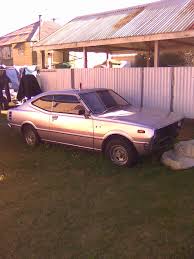
  1. Hey guys and girls. I'm trying to track down my first car. It's was a 1974 toyota corolla ke35 silvery purple with a metallic purple engine bay. I sold it back in 2008 then it was resold on here back in 2012 and I'm hoping it is still getting around. Any help would be greatly appreciated. These are a couple of pics of what it looked like. please message me on here or email me: [email protected] or sms me on 0432 108 612.
Account

Navigation

Search

Search

Configure browser push notifications

Chrome (Android)
  1. Tap the lock icon next to the address bar.
  2. Tap Permissions → Notifications.
  3. Adjust your preference.
Chrome (Desktop)
  1. Click the padlock icon in the address bar.
  2. Select Site settings.
  3. Find Notifications and adjust your preference.