Skip to content
View in the app

A better way to browse. Learn more.

rollaclub.com

A full-screen app on your home screen with push notifications, badges and more.

To install this app on iOS and iPadOS
  1. Tap the Share icon in Safari
  2. Scroll the menu and tap Add to Home Screen.
  3. Tap Add in the top-right corner.
To install this app on Android
  1. Tap the 3-dot menu (⋮) in the top-right corner of the browser.
  2. Tap Add to Home screen or Install app.
  3. Confirm by tapping Install.

corollaguy

Members
  • Joined

  • Last visited

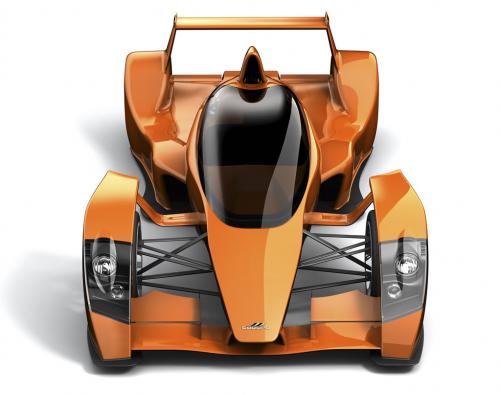
  1. This has to be the most insane road car ever built, 0-100 in 2.3 seconds, manages 3G in accelerating, braking and cornering and goes from 0-160 back to zero in 10 seconds!
  2. Gaday, I'm thinking of putting sigma Lca's on my Ke30 rally car to get a little camber. I'm just wanting to know what you have to do to instal them in a 30 and what you need. thanks.

Account

Navigation

Search

Search

Configure browser push notifications

Chrome (Android)
  1. Tap the lock icon next to the address bar.
  2. Tap Permissions → Notifications.
  3. Adjust your preference.
Chrome (Desktop)
  1. Click the padlock icon in the address bar.
  2. Select Site settings.
  3. Find Notifications and adjust your preference.