

Toms_Corolla
Members
-
Joined
-
Last visited
-
don't let the weather stop you it has been dry most of today Saturday and the forecast for sunday is showers clearing. Hasnt been anywhere enough rain to cause any floods. Paddy aka Toms Corolla
-
Hi can anyone please tell me where i can get the paint colour details for a KE11. I have a green KE11 and would like to keep the colour original. Thanks
-
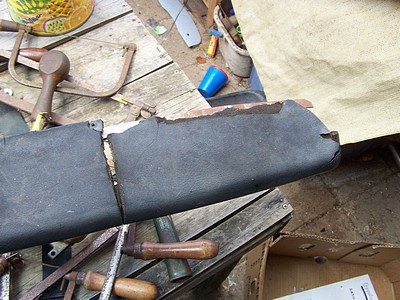
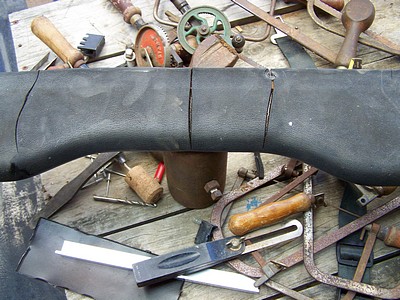
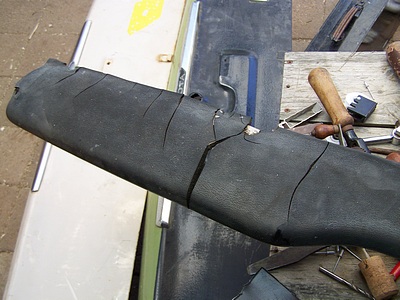
HI I am only a newbie to ROLLACLUB and would like to advertise the Gippsland Vehicle Collections JAPENESE VEHICLE DISPLAY to be held on Sunday December 14th at thier Maffra Shed. I have been to a few shows at the shed and they do a great job. They are looking for any Japenese vehicles to make a display. Details can be found on thier website http://www.gippslandvehiclecollection.org.au/ Or contact Leigh Shields Display Co-ordinator on 03-5141-1461 or 0429-164-763 Thanks Paddy aka Toms_CorollaHi all I have inherited Dads (Tom) KE11 Corolla. It came with a heap of spares many of them KE10. Cany anyone please tell me what the boot lids are and which grille belongs to the KE11. Have asked around for a dash top that could take repairing as mine is well past repair.[attachment =30308:100_1347.jpg]
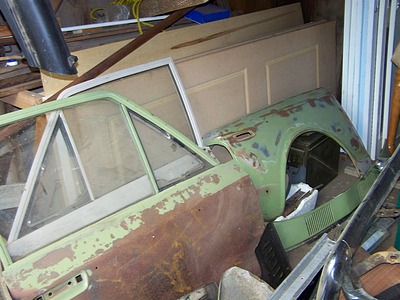
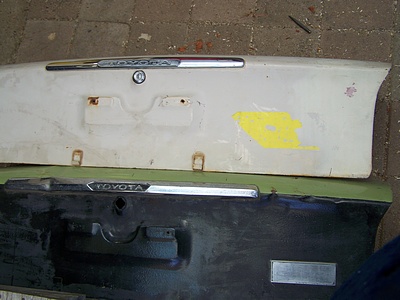
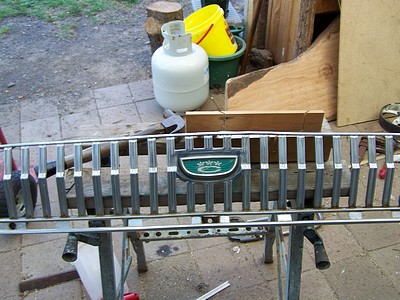
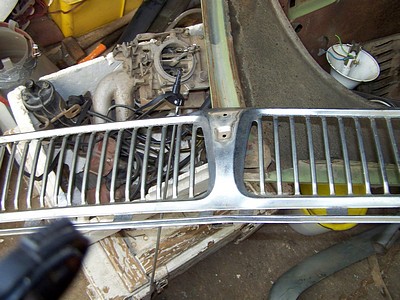
 Lexies Li'l Rice BurnerHi I have a KE11 in original condition that the wife wants as a daily driver. Have a SAAS sports wheel and need a boss to suit. What other KE series boss will fit. Thanks
Account
Navigation
Search
Configure browser push notifications
Chrome (Android)
- Tap the lock icon next to the address bar.
- Tap Permissions → Notifications.
- Adjust your preference.
Chrome (Desktop)
- Click the padlock icon in the address bar.
- Select Site settings.
- Find Notifications and adjust your preference.
Safari (iOS 16.4+)
- Ensure the site is installed via Add to Home Screen.
- Open Settings App → Notifications.
- Find your app name and adjust your preference.
Safari (macOS)
- Go to Safari → Preferences.
- Click the Websites tab.
- Select Notifications in the sidebar.
- Find this website and adjust your preference.
Edge (Android)
- Tap the lock icon next to the address bar.
- Tap Permissions.
- Find Notifications and adjust your preference.
Edge (Desktop)
- Click the padlock icon in the address bar.
- Click Permissions for this site.
- Find Notifications and adjust your preference.
Firefox (Android)
- Go to Settings → Site permissions.
- Tap Notifications.
- Find this site in the list and adjust your preference.
Firefox (Desktop)
- Open Firefox Settings.
- Search for Notifications.
- Find this site in the list and adjust your preference.