Skip to content
View in the app

A better way to browse. Learn more.

rollaclub.com

A full-screen app on your home screen with push notifications, badges and more.

To install this app on iOS and iPadOS
  1. Tap the Share icon in Safari
  2. Scroll the menu and tap Add to Home Screen.
  3. Tap Add in the top-right corner.
To install this app on Android
  1. Tap the 3-dot menu (⋮) in the top-right corner of the browser.
  2. Tap Add to Home screen or Install app.
  3. Confirm by tapping Install.

KE70Steve

Members
  • Joined

  • Last visited

Everything posted by KE70Steve

  1. KE70Steve replied to DR1FT's topic in Car Electrical
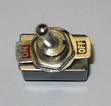
    Yo, So what did you end up doing ?? Cos i want to setup a toggle switch that turns my ignition on and off.. then i can just use my push button-starter and not have to use a screw driver :laff: What was the idea with the 6 wires at the back of the barrel ? i had a look but i don't want to stuff anything. btw, it doesnt have a radio so I'm not to worried about memory stuff etc etc. basicly, its the switch attached.. so instead of useing the key to turn the ignition on i wanna use this switch !! :doh: just need some help with what wire / wirers i would need to use to do so !! :( THANKS HEAPS, Steve.
Account

Navigation

Search

Search

Configure browser push notifications

Chrome (Android)
  1. Tap the lock icon next to the address bar.
  2. Tap Permissions → Notifications.
  3. Adjust your preference.
Chrome (Desktop)
  1. Click the padlock icon in the address bar.
  2. Select Site settings.
  3. Find Notifications and adjust your preference.