Skip to content
View in the app

A better way to browse. Learn more.

rollaclub.com

A full-screen app on your home screen with push notifications, badges and more.

To install this app on iOS and iPadOS
  1. Tap the Share icon in Safari
  2. Scroll the menu and tap Add to Home Screen.
  3. Tap Add in the top-right corner.
To install this app on Android
  1. Tap the 3-dot menu (⋮) in the top-right corner of the browser.
  2. Tap Add to Home screen or Install app.
  3. Confirm by tapping Install.

Twin Cam Rolla

Members
  • Joined

  • Last visited

  1. Nice colour, really suits the car
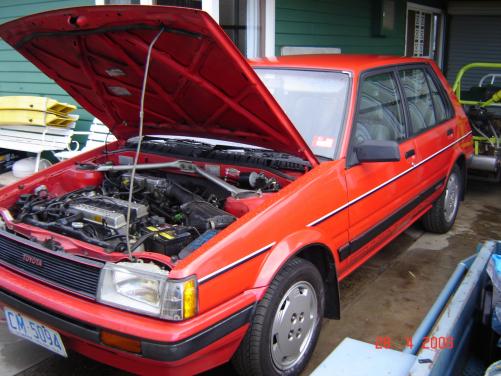
  2. thanks Guys The car with the green rollbar is a motorkhana special it has a mini engine in the back and the car with the white rollbar is a historic spotsracing car which also has a mini engine in the back here are a couple more pictures of my car
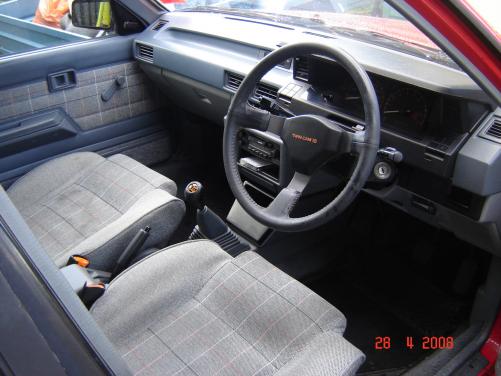
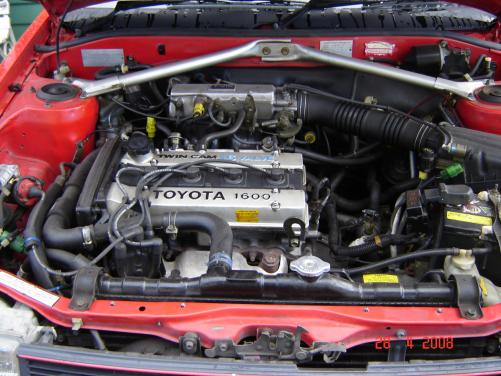
  3. Gday, New to this forum just thought that I would post up a couple of pics of my ride, Its an AE82 Twincam 184,000 kilometres on the engine, when I bought it it had been used for a run around car for about 10 years and was always kept outside so it was really faded, all that I have done is put some king low springs in and some KYB's thats about it. This is the best picture at the moment that I can Find ill look for a couple more then post them up Cheers Twin Cam Rolla
Account

Navigation

Search

Search

Configure browser push notifications

Chrome (Android)
  1. Tap the lock icon next to the address bar.
  2. Tap Permissions → Notifications.
  3. Adjust your preference.
Chrome (Desktop)
  1. Click the padlock icon in the address bar.
  2. Select Site settings.
  3. Find Notifications and adjust your preference.