Skip to content
View in the app

A better way to browse. Learn more.

rollaclub.com

A full-screen app on your home screen with push notifications, badges and more.

To install this app on iOS and iPadOS
  1. Tap the Share icon in Safari
  2. Scroll the menu and tap Add to Home Screen.
  3. Tap Add in the top-right corner.
To install this app on Android
  1. Tap the 3-dot menu (⋮) in the top-right corner of the browser.
  2. Tap Add to Home screen or Install app.
  3. Confirm by tapping Install.

Spite

Members
  • Joined

  • Last visited

Everything posted by Spite

  1. This post may be a bit old, but i'm new :jamie: and after spending ages beating the hell out of Tie Rod ends this is exactly what i need well done :blinks:
  2. Member Name - Spite (Dirk) Area -Gold Coast (Pimpama) Daily Drive -1996 Ford Laser Liata
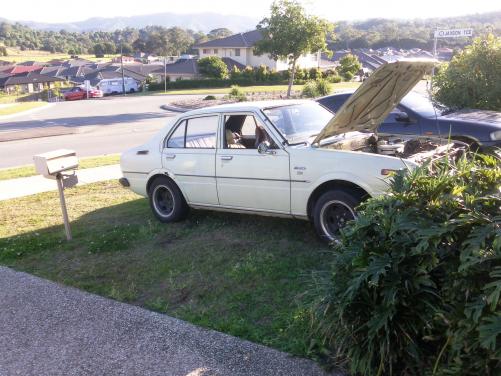
  3. Howdy all, My names Dirk I live on the northern GC (Pimpama) Just bought me 1st project car, (the add said it was a 4 speed 1975 1.2Ltr KE30) but funnily enough it became 5 years younger, the motor got bigger and i scored an extra gear :) I don't know squat about i'm doing or how to do it, so i guess ill be doing a lot of reading and question asking. got a few pic of the car, she don't look like much now but with a bit of time, a lot of swearing and blood shed hopefully it will be a nice car when i'm done.
Account

Navigation

Search

Search

Configure browser push notifications

Chrome (Android)
  1. Tap the lock icon next to the address bar.
  2. Tap Permissions → Notifications.
  3. Adjust your preference.
Chrome (Desktop)
  1. Click the padlock icon in the address bar.
  2. Select Site settings.
  3. Find Notifications and adjust your preference.