Skip to content
View in the app

A better way to browse. Learn more.

rollaclub.com

A full-screen app on your home screen with push notifications, badges and more.

To install this app on iOS and iPadOS
  1. Tap the Share icon in Safari
  2. Scroll the menu and tap Add to Home Screen.
  3. Tap Add in the top-right corner.
To install this app on Android
  1. Tap the 3-dot menu (⋮) in the top-right corner of the browser.
  2. Tap Add to Home screen or Install app.
  3. Confirm by tapping Install.

BobbyC

Members
  • Joined

  • Last visited

Everything posted by BobbyC

  1. Cheers mate :thumbsup:
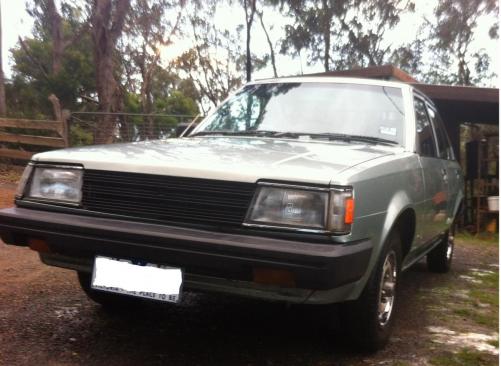
  2. Name: Thomas but people call me Bob Car: 1983 Toyota Corolla CS Motor and Driveline: Stock 4-speed 4K-C Suspension and Brakes: Stock Wheels and Tyres: El Stocko Interior: Not too shabby a tear in the drivers side seat and a few stains on the floor. Got a clock in my tacho so I'm always on time! Body: Baby blue with a sad amount of rust in the rear wheel arches :( Other: Hope to eventually find some nice wheels, lower it, fix the rust etc. but right now I'm focusing on finding a job first. Hopefully in Panel beating so I can do it all myself. Sorry about image quality Iphone cameras are not the best =/
Account

Navigation

Search

Search

Configure browser push notifications

Chrome (Android)
  1. Tap the lock icon next to the address bar.
  2. Tap Permissions → Notifications.
  3. Adjust your preference.
Chrome (Desktop)
  1. Click the padlock icon in the address bar.
  2. Select Site settings.
  3. Find Notifications and adjust your preference.