

Ae92_Corollin
Members
-
Joined
-
Last visited
-
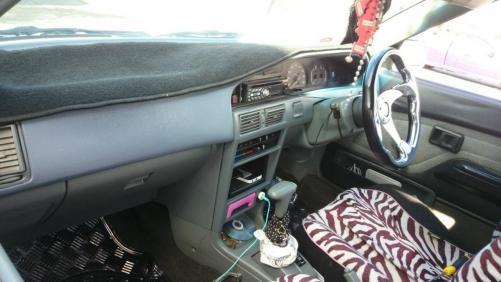
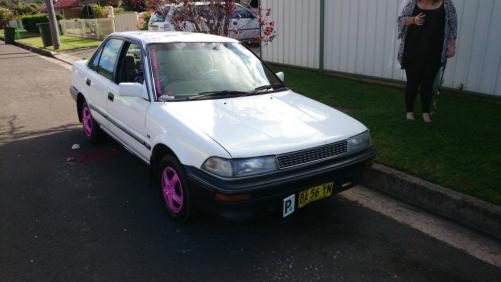
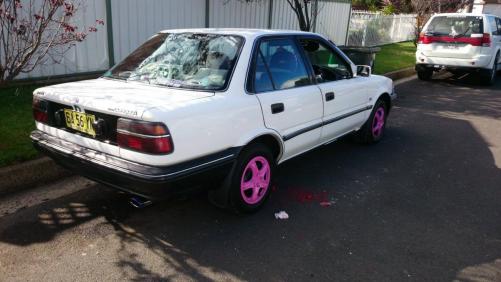
HEY GUYS, Here is my 1991 AE92 Corolla Auto. The car was partly a gift for me , i always wanted a Corolla and was suprised when i was given this one. I am currently doing it up on a budget as i am a student at TAFE. It isn't the best but i am trying to do it up as best i can :) MODS SO FAR; Chrome grille off an AE92 Seca LED parking lights pink speaker cages pink hubcaps black door handles (Still have to spray the back ones) Nightshaded taillights Sub & Amp White Wing Mirrors MODS I WANT TO DO ; New stereo spray paint headlights (the insides) touch up chipped paint colour code bumpers get rid of the trolley strips Spray some of the interior. Custom door inserts Lower it LED Strips for interior The upper model boot garnish FIND A DRIVERS SIDE HEADLIGHT COVER lol, only have 1 - If anyone has one let me know :) Boot spoiler Front bumper lip side skirts New Exhaust - Louder or deeper note. That's it so far. I came here to get advice and helpful Criticism so if you can help with ideas it's greatly appreciated :) THANK YOU :-)
-
HEY GUYS, Here is my AE92 Corolla Auto. The car was partly a gift for me , i always wanted a Corolla and was suprised when i was given this one.


