Skip to content
View in the app

A better way to browse. Learn more.

rollaclub.com

A full-screen app on your home screen with push notifications, badges and more.

To install this app on iOS and iPadOS
  1. Tap the Share icon in Safari
  2. Scroll the menu and tap Add to Home Screen.
  3. Tap Add in the top-right corner.
To install this app on Android
  1. Tap the 3-dot menu (⋮) in the top-right corner of the browser.
  2. Tap Add to Home screen or Install app.
  3. Confirm by tapping Install.

pimpmycorolla

Members
  • Joined

  • Last visited

Everything posted by pimpmycorolla

  1. hay i like ur blue rolla I have a ke 35 as well, I'm looking at enhancing the engine in the power depertmant if u no what i mean but they still are a very nice car. :cool:
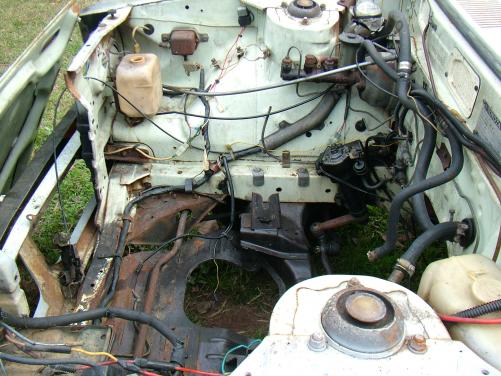
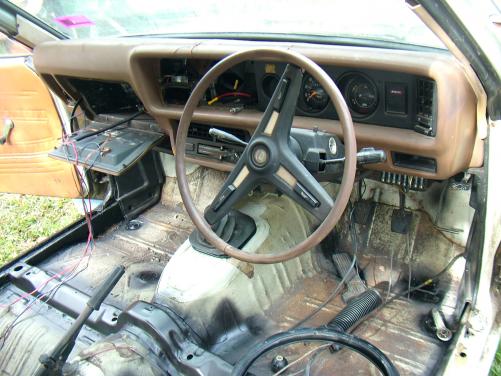
  2. my brothers corolla 1975 coupe looked like in a year or two it would be a old dead rusty car before I bought it from him for a $100 bucks and after one year of constant work and about 3 grand the car should be road worthy in a month. not to bad for a sixteen year old hay
Account

Navigation

Search

Search

Configure browser push notifications

Chrome (Android)
  1. Tap the lock icon next to the address bar.
  2. Tap Permissions → Notifications.
  3. Adjust your preference.
Chrome (Desktop)
  1. Click the padlock icon in the address bar.
  2. Select Site settings.
  3. Find Notifications and adjust your preference.