Skip to content
View in the app

A better way to browse. Learn more.

rollaclub.com

A full-screen app on your home screen with push notifications, badges and more.

To install this app on iOS and iPadOS
  1. Tap the Share icon in Safari
  2. Scroll the menu and tap Add to Home Screen.
  3. Tap Add in the top-right corner.
To install this app on Android
  1. Tap the 3-dot menu (⋮) in the top-right corner of the browser.
  2. Tap Add to Home screen or Install app.
  3. Confirm by tapping Install.

pullen

Members
  • Joined

  • Last visited

Everything posted by pullen

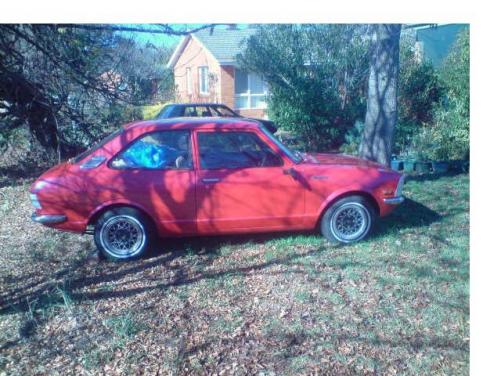
  1. NAME: Dan CAR: 1973 KE20 COROLLA MOTOR & DRIVELINE: HAD 4AGE 16V WORKED SOLD THAT TO UP GRADE TO 4AGZE WHEN I HAVE THE MONEY, CELICA 5SPEED STEEL CASE, AND MAZDA RX3 LSD SUSPENSION & BRAKES: RESET AND LOWERED LEAFS DOWN BACK AND LOWERED LOVELLS UP FRONT, KE70 BRAKES UP FRONT AND MAZDA RX3 DOWN BACK WHEELS AND TYRES: 13' HOTWIRES 165/75 UP FRONT 185/70 DOWN BACK WITH WHITE WALLS INTERIOR: ABIT OF THIS AN THAT, GOT 929 FRONT SEATS STOCK REAR SEAT DODGEY CUSTOM DASH AN BLACK TRIM BODY: STRAIGHT RUST FREE BODY, MASSIVE ROLLED FRONT GAURDS AND LIPPED REAR GAURDS, CUSTOM PAINT REDISH PINK WITH BABY BLUE PEARL
Account

Navigation

Search

Search

Configure browser push notifications

Chrome (Android)
  1. Tap the lock icon next to the address bar.
  2. Tap Permissions → Notifications.
  3. Adjust your preference.
Chrome (Desktop)
  1. Click the padlock icon in the address bar.
  2. Select Site settings.
  3. Find Notifications and adjust your preference.