Skip to content
View in the app

A better way to browse. Learn more.

rollaclub.com

A full-screen app on your home screen with push notifications, badges and more.

To install this app on iOS and iPadOS
  1. Tap the Share icon in Safari
  2. Scroll the menu and tap Add to Home Screen.
  3. Tap Add in the top-right corner.
To install this app on Android
  1. Tap the 3-dot menu (⋮) in the top-right corner of the browser.
  2. Tap Add to Home screen or Install app.
  3. Confirm by tapping Install.

Leaderboard

Popular Content

Showing content with the highest reputation on 06/22/18 in all areas

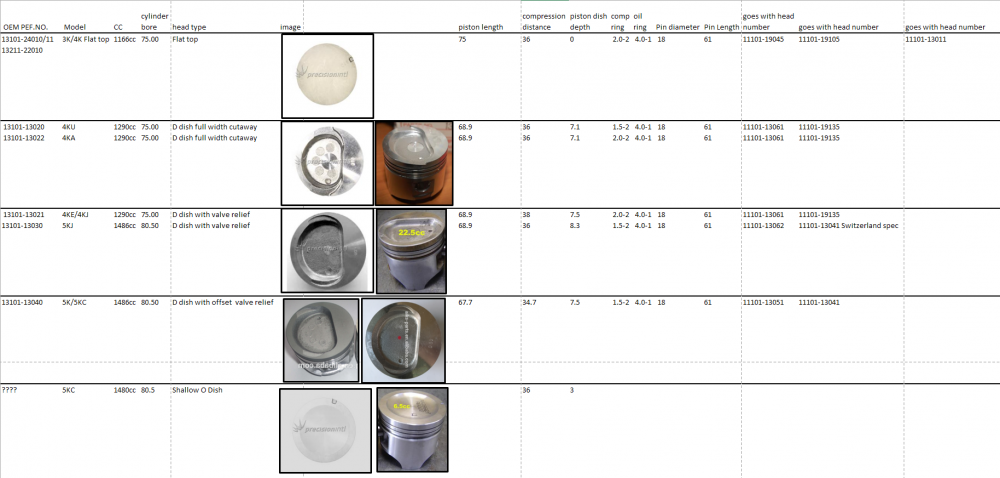
  1. For anyone who got too frustrated, and just asked the parts store to look at each piston, sorry that this was too late. This should probably go on the wiki page. Ask me for the xl file with the data. Not totally finished yet, but what i have done is confirmed correct. Sources: japan-parts.eu (some incorrect data verified by other sources) Precision intl (pictures) Alibaba (good source of cheap Chinese exporters with product photos) rollaclub (images) ebay (people selling new products in boxes with part numbers) JCC Pistons (Dimensions) http://www.jcc-tw.com/en/
Account

Navigation

Search

Search

Configure browser push notifications

Chrome (Android)
  1. Tap the lock icon next to the address bar.
  2. Tap Permissions → Notifications.
  3. Adjust your preference.
Chrome (Desktop)
  1. Click the padlock icon in the address bar.
  2. Select Site settings.
  3. Find Notifications and adjust your preference.