Skip to content
View in the app

A better way to browse. Learn more.

rollaclub.com

A full-screen app on your home screen with push notifications, badges and more.

To install this app on iOS and iPadOS
  1. Tap the Share icon in Safari
  2. Scroll the menu and tap Add to Home Screen.
  3. Tap Add in the top-right corner.
To install this app on Android
  1. Tap the 3-dot menu (⋮) in the top-right corner of the browser.
  2. Tap Add to Home screen or Install app.
  3. Confirm by tapping Install.

CruzinThaRolla

Members
  • Joined

  • Last visited

  1. Hey mate can i grab 5 url types in orange cheers michael :)
  2. CruzinThaRolla replied to Jared's topic in SA / Adelaide
    A bright cherry red KE30 on adelaide rd in murray bridge looked so good!!! :D
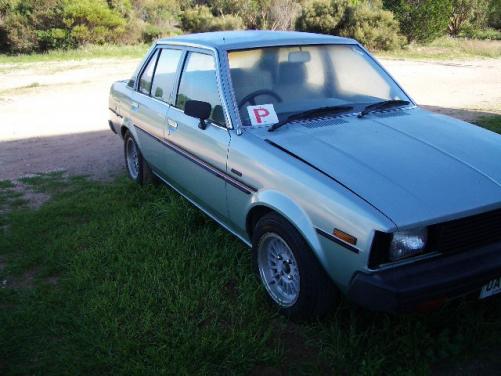
  3. Hey new to this forum so here it goes my name is Michael, 19 live in the murraylands and just bought my first rolla, always wanted one and now finally here it is:D its a silver 1983 KE70 5 speed got it for $850 with 3 months rego, lowered, triton rear springs stiff shocks(hard as Fck), exhaust has a bit of a note and some meshies allround ;) bit of rust in normal spots, one day want to fix this and give it a decent paint job but as for now I'm just loving driving it around just for the hell of it :D Keen to orginse a rolla cruze soon coz it would be awesome to see more rolla owners and their rides :D
Account

Navigation

Search

Search

Configure browser push notifications

Chrome (Android)
  1. Tap the lock icon next to the address bar.
  2. Tap Permissions → Notifications.
  3. Adjust your preference.
Chrome (Desktop)
  1. Click the padlock icon in the address bar.
  2. Select Site settings.
  3. Find Notifications and adjust your preference.