Skip to content
View in the app

A better way to browse. Learn more.

rollaclub.com

A full-screen app on your home screen with push notifications, badges and more.

To install this app on iOS and iPadOS
  1. Tap the Share icon in Safari
  2. Scroll the menu and tap Add to Home Screen.
  3. Tap Add in the top-right corner.
To install this app on Android
  1. Tap the 3-dot menu (⋮) in the top-right corner of the browser.
  2. Tap Add to Home screen or Install app.
  3. Confirm by tapping Install.

PanchitoKP

Members
  • Joined

  • Last visited

Everything posted by PanchitoKP

  1. PanchitoKP replied to curly's topic in Motorsport
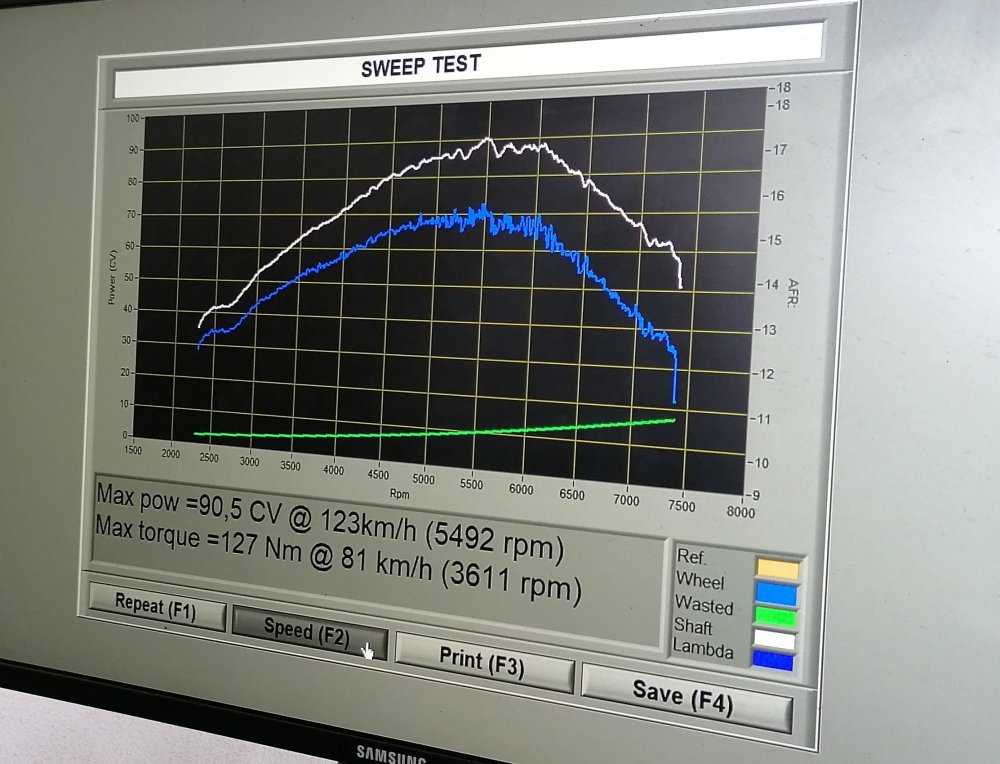
    Starlet KP61 NA 4K bored to 80.5mm pretty much stock CR balanced and lightened bottom end (+/- 2.5kgs lighter) +1mm oversized valves Kentcam T124 camshaft with handmade adjustable pulley martelius handmade manifold replica 2x weber idf 36 eletronic dizzy std 98 octane fuel 87hp (+/- 65kW with muffler) 90hp (+/- 67kW without muffler, straight piped)

Account

Navigation

Search

Search

Configure browser push notifications

Chrome (Android)
  1. Tap the lock icon next to the address bar.
  2. Tap Permissions → Notifications.
  3. Adjust your preference.
Chrome (Desktop)
  1. Click the padlock icon in the address bar.
  2. Select Site settings.
  3. Find Notifications and adjust your preference.