

Daveb
Members
-
Joined
-
Last visited
-
Dave 5k, Sprinter twin carbs, extractors, 5 speed Ke20 front discs Mazda 626 rwd steel rims Celica ta22 seats, Sprinter speedo/ tacho , sports steering wheel Body standard ( needs some tlc & paint ! ) Had car nearly 12 years , had a variety of Ke's including ke15 , ke20 , ke11 , ke10's including the blue club car owned by Brendo (had it between 93 - 97 )
-
Have just joined rollaclub and came across what looks like my old car. Last time i saw this car it was blue! Used to own it ( Sold it in 1997 to a guy in Launceston , Worst thing i've ever done ) When i bought it was a road car . Found all the race bits and converted back to race car . Also fitted Watts link which was from a Sports sedan . Got down to 1.10.9 at Symmons. Think you may have sold it ,been told it is in Turners Beach now.
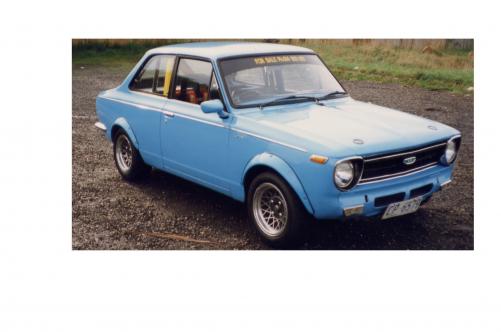
-
I have a picture of a KE11 i had a few years ago and it only has "se" badge on rh side ;)
