Skip to content
View in the app

A better way to browse. Learn more.

rollaclub.com

A full-screen app on your home screen with push notifications, badges and more.

To install this app on iOS and iPadOS
  1. Tap the Share icon in Safari
  2. Scroll the menu and tap Add to Home Screen.
  3. Tap Add in the top-right corner.
To install this app on Android
  1. Tap the 3-dot menu (⋮) in the top-right corner of the browser.
  2. Tap Add to Home screen or Install app.
  3. Confirm by tapping Install.

Leaderboard

Popular Content

Showing content with the highest reputation on 12/23/18 in all areas

  1. 1 point
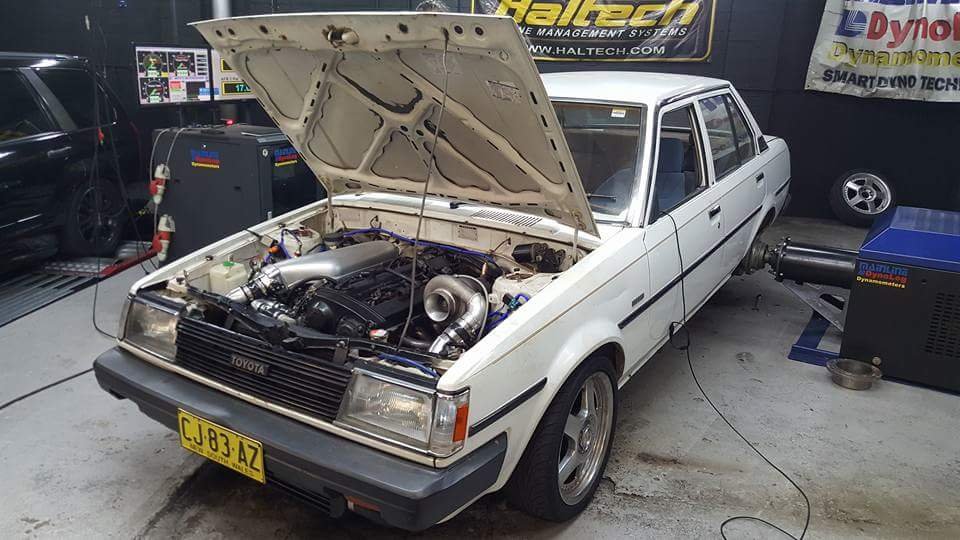
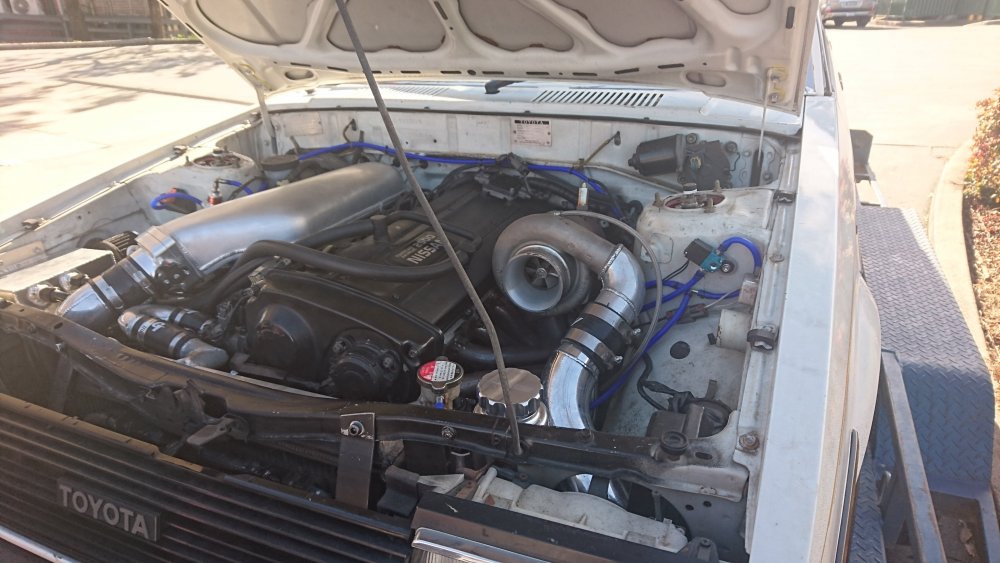
    hi guys been about 8 years since i was last here thought i would do a quick up date. i had to sell the car a few years ago but still talk to the new owner, its had a lot of time and money put into it by the new owner and is on it's way to 9 second pass, anyway here is a few photos of the new setup.it's making 607hp at the tyres on 28psi on E85 , sad i had to sell it but happy someones put the effort in and it's going good. it's getting a few upgrades and should be back at it and try to crack that 9 soon.
Account

Navigation

Search

Search

Configure browser push notifications

Chrome (Android)
  1. Tap the lock icon next to the address bar.
  2. Tap Permissions → Notifications.
  3. Adjust your preference.
Chrome (Desktop)
  1. Click the padlock icon in the address bar.
  2. Select Site settings.
  3. Find Notifications and adjust your preference.