Skip to content
View in the app

A better way to browse. Learn more.

rollaclub.com

A full-screen app on your home screen with push notifications, badges and more.

To install this app on iOS and iPadOS
  1. Tap the Share icon in Safari
  2. Scroll the menu and tap Add to Home Screen.
  3. Tap Add in the top-right corner.
To install this app on Android
  1. Tap the 3-dot menu (⋮) in the top-right corner of the browser.
  2. Tap Add to Home screen or Install app.
  3. Confirm by tapping Install.

Leaderboard

Popular Content

Showing content with the highest reputation on 06/15/21 in all areas

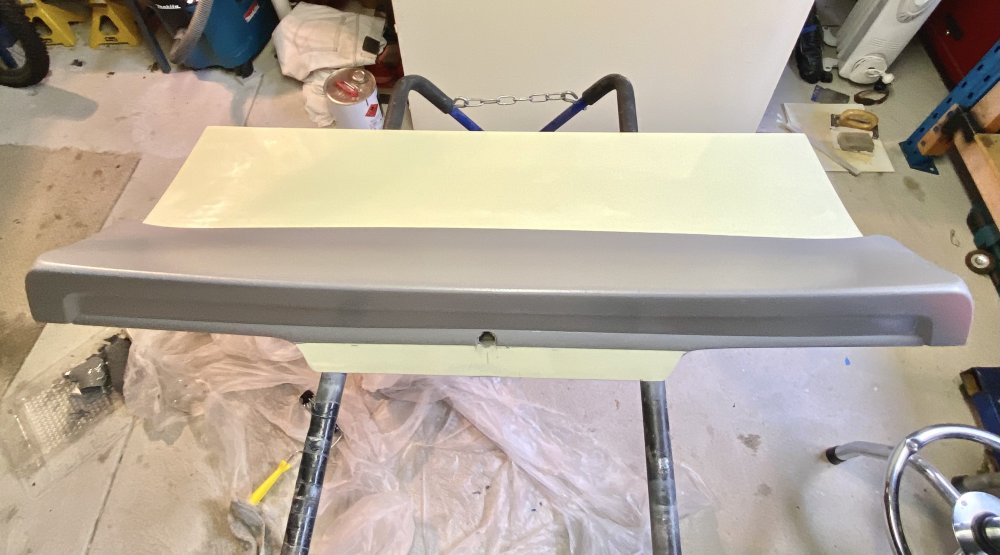
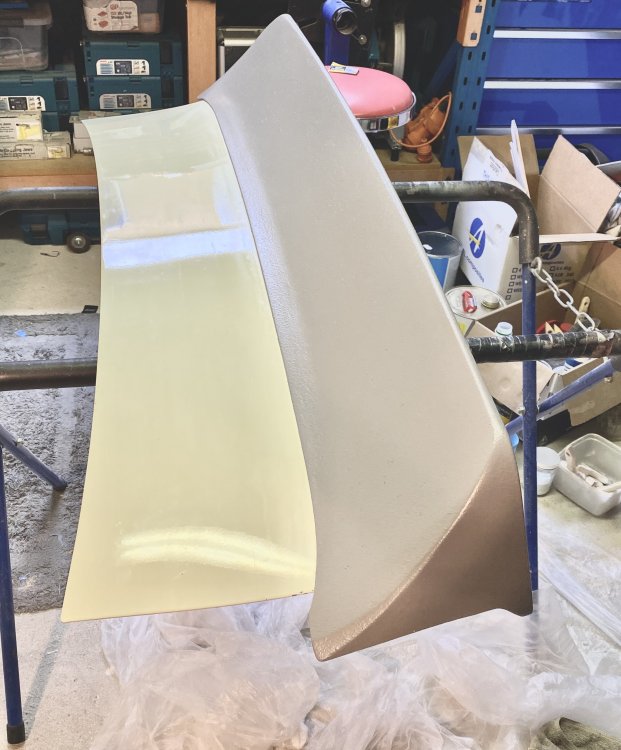
  1. It’s primed and sealed. No more bog, only taken a month to get to this stage of making the plug!! I am finally done with filler, i think it’s as symmetrical and straight as it’s going to get. Key take away, next time keep it simple with flat surfaces. I think I went to complex making it with compound curves and trying to follow the cars profile too much Anyway it’s done, final sanding to 1200 grit to go and then it’s ready to pull a mould from it.
Account

Navigation

Search

Search

Configure browser push notifications

Chrome (Android)
  1. Tap the lock icon next to the address bar.
  2. Tap Permissions → Notifications.
  3. Adjust your preference.
Chrome (Desktop)
  1. Click the padlock icon in the address bar.
  2. Select Site settings.
  3. Find Notifications and adjust your preference.