

Toy-Yoda
Region Leader[RL]
-
Joined
-
Last visited
Everything posted by Toy-Yoda
-
And that Corona was HILARIOUS Kinda bummed we didn't get any video of the run I took it on, next time maybe.Hunting from Moose ;) Just outside the right of the frame: The nanna KE70 we were taking potshots at :jamie:Volvo's, they're great shooting rigs :P
 No backstory, just enjoy the randomness.... And I want those lights for my chopper, have backed the company that designed them, just waiting for a final release product..... Also:
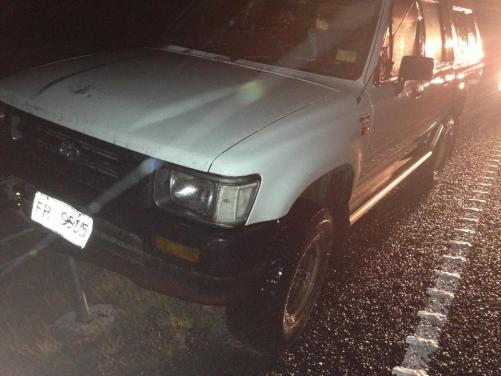
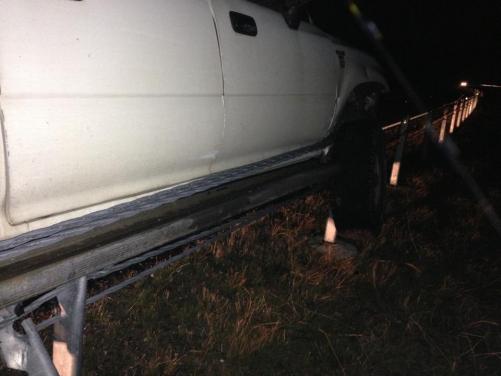
 Because kerbing Datsuns with impunity?Was still a double lane area, the cones could have been there for a couple reasons, primarily that I took out a 30m section of the cable barrier, secondly, a woman who stopped her car on the other side of the highwayto see if I was ok got her car clipped by some lowlife Excel driving retard who immediately abandoned the POS on the side of the road a couple hundred meters away and ran off into the bush..... Fun night for all involved.It should bolt straight up, and the clutch should work exactly as intended. (It did in one of mine, many many moons ago) Same bolt pattern, but less mass than the standard 5K flywheel, and a slightly smaller clutch if memory serves.Yep, I broke the unbreakable..... It's a talent.Ladies and Gentlemen: Falling asleep at the wheel isn't fun. Also, those rumble strips on the sides of the highway don't do a damned thing.
Account
Navigation
Search
Configure browser push notifications
Chrome (Android)
- Tap the lock icon next to the address bar.
- Tap Permissions → Notifications.
- Adjust your preference.
Chrome (Desktop)
- Click the padlock icon in the address bar.
- Select Site settings.
- Find Notifications and adjust your preference.
Safari (iOS 16.4+)
- Ensure the site is installed via Add to Home Screen.
- Open Settings App → Notifications.
- Find your app name and adjust your preference.
Safari (macOS)
- Go to Safari → Preferences.
- Click the Websites tab.
- Select Notifications in the sidebar.
- Find this website and adjust your preference.
Edge (Android)
- Tap the lock icon next to the address bar.
- Tap Permissions.
- Find Notifications and adjust your preference.
Edge (Desktop)
- Click the padlock icon in the address bar.
- Click Permissions for this site.
- Find Notifications and adjust your preference.
Firefox (Android)
- Go to Settings → Site permissions.
- Tap Notifications.
- Find this site in the list and adjust your preference.
Firefox (Desktop)
- Open Firefox Settings.
- Search for Notifications.
- Find this site in the list and adjust your preference.


