Toy-Yoda
Region Leader[RL]
-
Joined
-
Last visited
Everything posted by Toy-Yoda
-
^^ That's looks pretty accurate.

-
I know, just playing :P
-
I'm gonna go right ahead and claim zero responsibility for that...........If only you put this up 2 weeks ago, I just scrapped an RA60 :bash:3.5K with a bent chassis......yeah :blinks:I avoided the Death star, it's a little too flimsy and virtually impossible to display the way I have in mind..... Top picture is the big Millennium Falcon :jamie:Metric shitload of Lego. (10179) Imperial shitload of Lego. (10221)
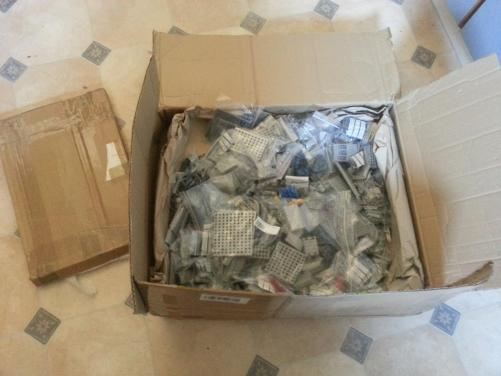
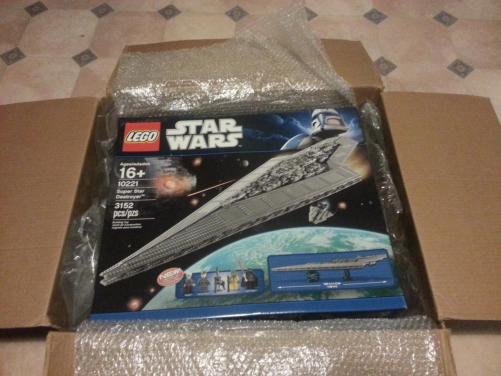 Sorta sprung..... I haven't been flying a KE in ages.... ....Better do something about that :PSillycar is a parts bitch, always need moar bits. Especially engine and driveline bits. They seem to break a lot. SEND ALLTHE BITS.
 Ok, so miracles do happen and I've acually picked up tools and worked on a car :o Since I bent the last one a little, I figured I'd build one properly in an attempt to actually finish a car for once. So it's been sitting in the yard getting rustier and moldy while I collected parts (plus tools) and got a rough plan of things to do. Started with this on Thursday last week Hit it with some hammers and drank a little alcohol and it changed colour a bit. This is more or less how it sits now. Overspray ʞ©$ɟing EVERYWHERE, but it's red, and that's what matters. Next, an attempt at rego. Yes Ryan, it's getting THAT engine. And finally, just for luls.

 I like it.
 I really need to stop drinking so much while working on cars.....

Account
Navigation
Search
Configure browser push notifications
Chrome (Android)
- Tap the lock icon next to the address bar.
- Tap Permissions → Notifications.
- Adjust your preference.
Chrome (Desktop)
- Click the padlock icon in the address bar.
- Select Site settings.
- Find Notifications and adjust your preference.
Safari (iOS 16.4+)
- Ensure the site is installed via Add to Home Screen.
- Open Settings App → Notifications.
- Find your app name and adjust your preference.
Safari (macOS)
- Go to Safari → Preferences.
- Click the Websites tab.
- Select Notifications in the sidebar.
- Find this website and adjust your preference.
Edge (Android)
- Tap the lock icon next to the address bar.
- Tap Permissions.
- Find Notifications and adjust your preference.
Edge (Desktop)
- Click the padlock icon in the address bar.
- Click Permissions for this site.
- Find Notifications and adjust your preference.
Firefox (Android)
- Go to Settings → Site permissions.
- Tap Notifications.
- Find this site in the list and adjust your preference.
Firefox (Desktop)
- Open Firefox Settings.
- Search for Notifications.
- Find this site in the list and adjust your preference.