Skip to content
View in the app

A better way to browse. Learn more.

rollaclub.com

A full-screen app on your home screen with push notifications, badges and more.

To install this app on iOS and iPadOS
  1. Tap the Share icon in Safari
  2. Scroll the menu and tap Add to Home Screen.
  3. Tap Add in the top-right corner.
To install this app on Android
  1. Tap the 3-dot menu (⋮) in the top-right corner of the browser.
  2. Tap Add to Home screen or Install app.
  3. Confirm by tapping Install.

oneprojectrolla

Members
  • Joined

  • Last visited

  1. Hey I'm new to this cruze seen, but I'm from wollongong and would like to meet up with you all at the pie shop or the blow hole. How long is the drive down for you guys, est time of arrival and I'll try to meet up with ya.
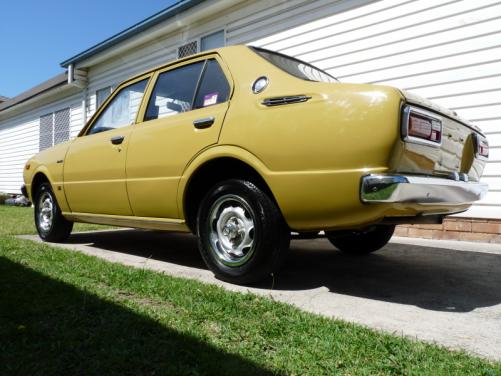
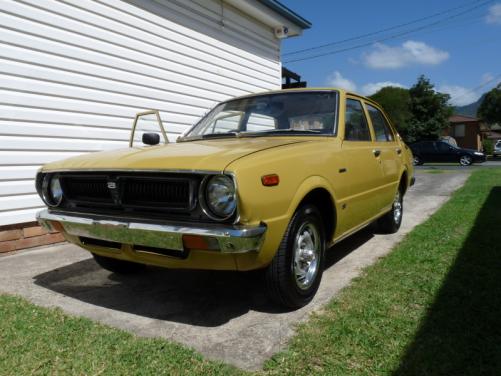
  2. Thanks mate, I've spent the last 8 months looking for one like her. Condition etc...
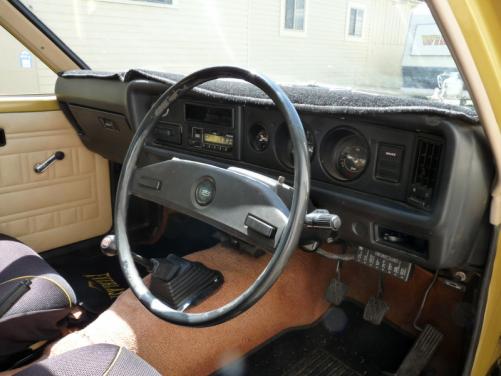
  3. Name: Joel Goodwin Car:1976 Toyota corolla SE Motor & Driveline:Orignal motor 3K and a 4 speed manual Suspension & Brakes:Stock Wheels & Tyres:Stock Interior:Orignal interior, no tears or rips in any of the seats or door trim Body:minimal rust on front lower guard and behind drivers side passger door, other then that body is straight and very clean. Other:She's just a run around/stay stock(orignal) for now but big plans for the future!
Account

Navigation

Search

Search

Configure browser push notifications

Chrome (Android)
  1. Tap the lock icon next to the address bar.
  2. Tap Permissions → Notifications.
  3. Adjust your preference.
Chrome (Desktop)
  1. Click the padlock icon in the address bar.
  2. Select Site settings.
  3. Find Notifications and adjust your preference.