Skip to content
View in the app

A better way to browse. Learn more.

rollaclub.com

A full-screen app on your home screen with push notifications, badges and more.

To install this app on iOS and iPadOS
  1. Tap the Share icon in Safari
  2. Scroll the menu and tap Add to Home Screen.
  3. Tap Add in the top-right corner.
To install this app on Android
  1. Tap the 3-dot menu (⋮) in the top-right corner of the browser.
  2. Tap Add to Home screen or Install app.
  3. Confirm by tapping Install.

philthy30

Regular Member
  • Joined

  • Last visited

Everything posted by philthy30

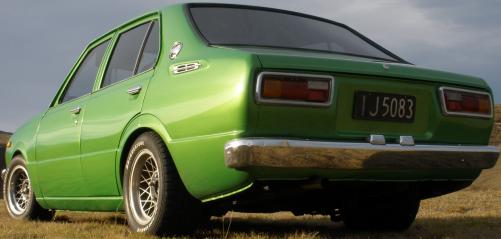
  1. this is my ke30 1977 fully dismantled and soda blasted rebuilt from the ground up rebuilt 4k balanced, cam, porting, shaved head, lightened flywheel, this is one lumpy motor. full panel and paint in custom green with yellow pearl, 13 by 7 hotwires with brand new 215 50 13 bridgestone eagers, prof. tinted windows, central locking, 5 star alarm, full sounds, new carpet, interior still to be reupholstered. tell me what you think.
Account

Navigation

Search

Search

Configure browser push notifications

Chrome (Android)
  1. Tap the lock icon next to the address bar.
  2. Tap Permissions → Notifications.
  3. Adjust your preference.
Chrome (Desktop)
  1. Click the padlock icon in the address bar.
  2. Select Site settings.
  3. Find Notifications and adjust your preference.