Skip to content
View in the app

A better way to browse. Learn more.

rollaclub.com

A full-screen app on your home screen with push notifications, badges and more.

To install this app on iOS and iPadOS
  1. Tap the Share icon in Safari
  2. Scroll the menu and tap Add to Home Screen.
  3. Tap Add in the top-right corner.
To install this app on Android
  1. Tap the 3-dot menu (⋮) in the top-right corner of the browser.
  2. Tap Add to Home screen or Install app.
  3. Confirm by tapping Install.

moreno180

Members
  • Joined

  • Last visited

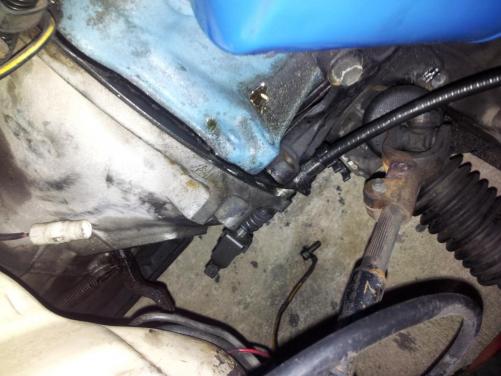
  1. hey guys been looking can't find anything...I'm trying to get my 4kc out of my ke70 but the clutch cable wont come.out it goes through the plate that sits between the motor and gbox but the cable also goes through a gbox hole and.the end wont fit through any help would be awesone
  2. awesome dash dude good work
  3. ur helmet = awesome
  4. nice wagon dude meshies look tuff on 2door wagons :y:
  5. nice dude :y:
  6. moreno180 replied to 1JZKe55's topic in Rollaclub Rides
    wow dude wow
  7. awesome car....awesome dash :y:

Account

Navigation

Search

Search

Configure browser push notifications

Chrome (Android)
  1. Tap the lock icon next to the address bar.
  2. Tap Permissions → Notifications.
  3. Adjust your preference.
Chrome (Desktop)
  1. Click the padlock icon in the address bar.
  2. Select Site settings.
  3. Find Notifications and adjust your preference.